Web platform ● Live
DWG Multilingual Drawing Translator
The drawing structure is left untouched;
text is extracted, translated and replaced entity by entity.
  • In-house DWG parsing and rebuild engine
  • Entity-level text extraction — every layer, block and shape preserved
  • Multi-stage AI translation tuned for the engineering domain
  • Adaptive glossary that learns per project
  • Two operating modes — Online (managed cloud) for general drawings, and Secure Mode, which uses only an LLM endpoint with no external translation API in the pipeline
  • 5 drawings a day free · unlimited with a VIP Key
96.3%
real-world success
<2 min
per drawing
7
output languages
v2.0
current version

Built by an engineer,
for engineers

Validated on over 1,000 real construction drawings from an automotive manufacturing plant project in Kazakhstan (2023–2025). Unlike generic translators, it preserves not just the words but the engineering intent.

Structural member specifications, connection details, tolerances, material callouts — information where a mistranslation becomes a safety incident, handled with field-proven accuracy.

Auto-detect (source) English 한국어 日本語 Tiếng Việt Français Español Deutsch 中文 (coming soon)
Try it free → Download sample drawing (RU) ↓ Intro video ▶

No file at hand? Download this Russian sample drawing, translate it and compare the result — no file of your own needed.

Three steps.
One translated drawing.

Upload a file and receive a fully translated, AutoCAD-compatible DWG within minutes.

01
Upload DWG

Drag and drop your DWG file. The drawing structure is analyzed and every text string to translate is extracted, with all layers, blocks and geometry untouched.

02
AI translation

A multi-stage AI engine translates each string with an understanding of the engineering context. An adaptive glossary keeps terminology consistent across the whole project.

03
Download result

The translated text is placed back at the exact entity positions. The output DWG is fully compatible with AutoCAD and major CAD platforms, ready to use.

Your drawings never
leave your environment

In defense, semiconductor and advanced manufacturing facilities, engineering drawings are confidential assets that cannot be sent to public translation services. Sinbiroum offers two operating modes — Online Mode for general, non-sensitive drawings, and Secure Mode, which uses only an LLM endpoint as its language backend, with no external translation API anywhere in the pipeline. It is the exact configuration that processed over 1,000 drawings entirely inside the client's intranet on the automotive plant project in Kazakhstan.

🛡️
Operating modes
Secure Mode & Online Mode
Choose by project sensitivity
Secure Mode (LLM-only backend) for confidential projects; the managed cloud demo at /dwg-trans/ (Online Mode) for general drawings.
🔒
Secure Mode
LLM-only pipeline
No external translation API
In Secure Mode the only language-model dependency is a single LLM endpoint — drawing text never passes through an external translation service.
🏭
Target environments
Designed for sensitive facilities
Defense · Semiconductor · Critical infrastructure
Suited to environments with facility-security or export-control requirements — defense, semiconductor fabs, critical-infrastructure operators.
✅
Engine track record
Secure Mode field-validated
1,000+ real drawings · automotive plant, Kazakhstan
The same Secure Mode configuration that processed over 1,000 drawings on a real industrial project — not a cut-down version, but the full pipeline running inside the client's intranet.
Discuss a Secure deployment →

What engineers say

Feedback from professionals using the platform on real projects.

★★★★★

"We translated over 1,000 Russian structural drawings on an automotive plant project. What used to take the team weeks now takes a day. The time saved alone was reason enough to switch."

D. Park
Construction project manager · Automotive plant, Kazakhstan
March 2025
★★★★★

"What surprised me most was the accuracy of the structural terminology — member specs, weld callouts and material grades all came out right. The DWG opens perfectly in AutoCAD with no cleanup."

S. Yoon
Structural engineer · Steel fabrication, Korea
February 2026
★★★★☆

"Multilingual support is a game changer for international projects. We can now handle Japanese and Vietnamese drawings too. Looking forward to Chinese support."

M. Tanaka
Plant design engineer · EPC company, Japan
March 2026
★★★★★

"Every layer, block reference and dimension stayed in place after translation. As an MEP engineer I worried the annotations would shift, but nothing moved. Impressive."

A. Petrov
MEP engineer · Building services, UAE
January 2026

From one address,
read national 3D data instantly

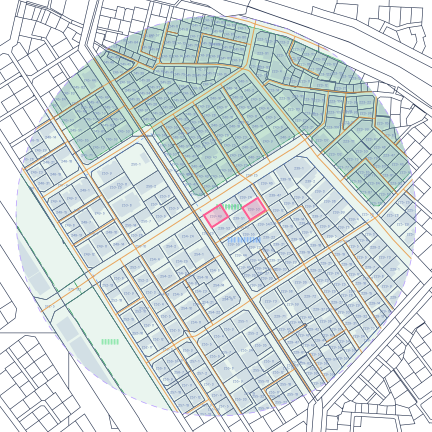
GeoLoad connects to national geospatial data (V-World) in real time and, from a single parcel number, rebuilds the site's buildings, cadastre, roads, satellite imagery and terrain in 3D. Structural engineers can grasp the site conditions at the very start of design.

On top of that come the load inputs structural design needs — surface roughness categories A–D determined for 16 directions, and the effective ground acceleration for seismic load, spatially interpolated from the 2,400-year national seismic hazard map.

Open GeoLoad → Intro video ▶ Contact us

* Surface roughness and seismic effective ground acceleration use live data; some items such as the topographic factor (Kzt) are approximations based on KDS formulas.

Web service ● Live
GeoLoad — Geospatial site analysis
One parcel number, national geospatial data in real time —
a 3D site model and structural design loads.
  • Live V-World geocoding, buildings, cadastre, roads and satellite imagery
  • Surface roughness (categories A–D, 16 directions) from real data
  • Seismic effective ground acceleration — interpolated from the 2,400-year national seismic hazard map
  • Interactive deck.gl WebGL rendering of terrain, buildings and contours
  • Same-origin FastAPI (Cloud Run, scale-to-zero) — no CORS, no personal data stored
  • Automatic site analysis report (HTML with embedded WebGL)
Live
V-World national geospatial data
A–D
roughness, 16 directions
2,400y
seismic return-period map
3D
deck.gl WebGL

Company files stay on the NAS,
AI does the answering

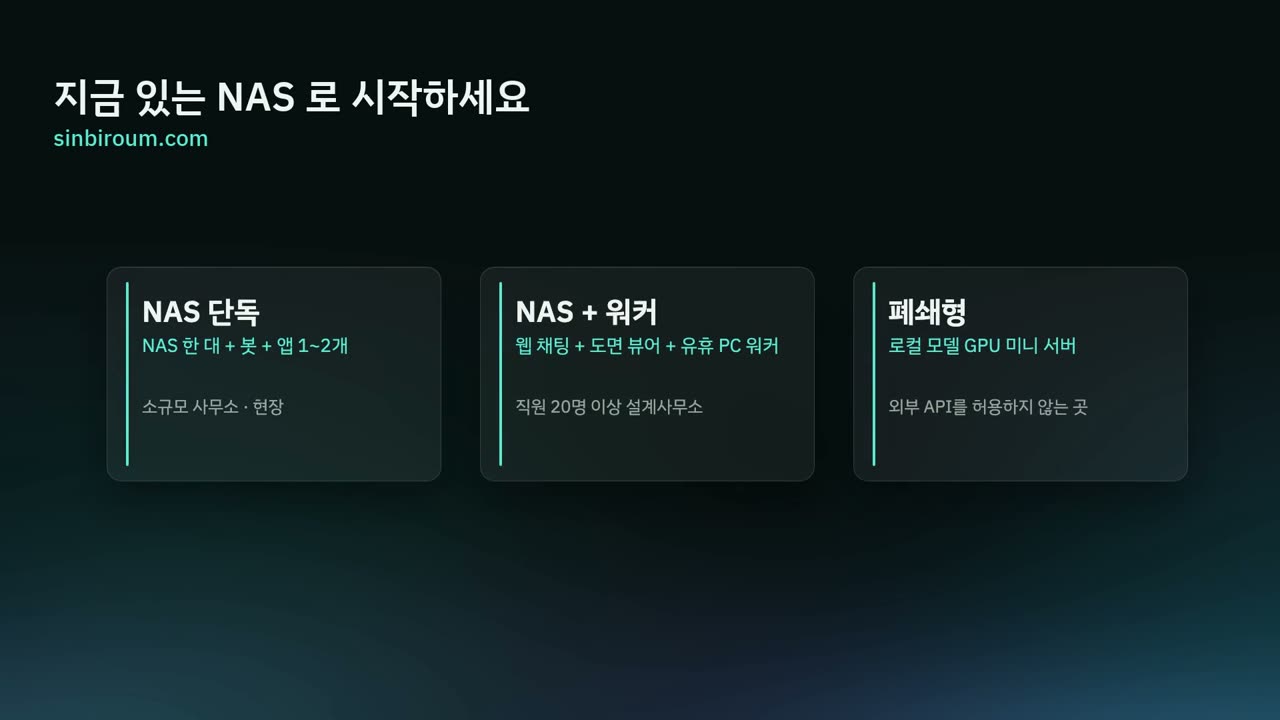
A single container on the NAS your company already uses becomes an in-house AI assistant. Staff ask through the company messenger or web chat, and the bot finds the answer among hundreds of thousands of working documents, project files and internal contacts.

Conversations, document indexes and surveys stay on company equipment only; the only thing that leaves is the query text needed to generate an answer. Industry apps such as cadastral DXF, site conditions, ground surveys and road view are bundled with it.

More about NAS AI → Try the cadastral app ↗
On-premise ● In production
NAS AI intro video Intro video 1:39
  • File search · project files · internal contacts · NAS how-to · weekly survey
  • Synology Chat bot + in-house web chat (PC · phone)
  • Everything stored on the company NAS, no model training, original files never sent

Three mismatches in today's design office

As automation and AI arrive, the office balance is slipping in three places: resources, cost and security.

01 · Resources

PCs sit idle, servers run short

As automation lets fewer people do the same work, the PCs once assigned per employee sit idle while more servers are needed to run the automation. Most offices have just one NAS.

One container on the NAS you already have — no new server needed.
02 · Cost

AI subscriptions pile onto licenses

Licenses for CAD and other software stay the same, and AI subscriptions come on top. Subscribe per employee and the cost grows with headcount.

One company bot as the AI channel — one company account, usage logged per employee.
03 · Security

Data leaks through everyone's own AI

With personal AI accounts, sensitive information can leave the company without anyone knowing. Ban it, and people use it secretly — creating only blind spots.

Files stay on the company NAS; only the query text goes to the AI.
Web service ● Live
Any1 — Sharing on Google Drive
Files stay in the customer's own Drive;
a BYOD platform that adds only the sharing, permission and delivery layer.
  • BYOD — files are stored in the customer's Google Shared Drive (the operator cannot access contents)
  • Zero storage and egress cost — the customer's own Drive
  • Nothing to install — any device with a web browser
  • Received/sent file boxes · group and member permissions · share-link tracking
  • Local, Google, Naver and Kakao sign-in · API key (HMAC-SHA256) sessions
  • AI-assisted features such as an Excel importer and activity log
$0
storage & egress cost
0
no install
100%
kept in customer's Drive
Web
all devices

Your files,
only in your Drive

Any1 is a file-sharing SaaS built on Google Drive. Files stay stored in the customer's Google Drive, and Any1 provides only the UI layer on top for sharing, permissions and delivery. Even the operator cannot physically see file contents.

That means no storage or egress cost and nothing to install. With just a web browser, your team can reach and share project files anytime, anywhere, on any device.

Visit any1.cloud → Sign in →

* any1.cloud runs independently on its own domain.

Apps crafted
with care

From physics puzzles to AI utilities — find them on the App Store.

Number Baseball
Web · iOS
Number Baseball

A classic number-guessing brain game. Challenge friends in real-time online matches or take on the CPU across a 5-tier league.

▶ Play in your browser — NEW → View on the App Store →
Coin Bounce
iOS
Coin Bounce

Physics-based puzzle — flick a coin over obstacles to hit the target. 5-stage solo campaign and 2-player local party mode.

View on the App Store →
VoiceNote
Beta
VoiceNote

An always-on time-machine recorder. It keeps a rolling 2-hour buffer so you can save a conversation after it happened. AI transcription, auto summary, Apple Watch support.

Coming soon
News Briefing
In development
News Briefing

AI collects and summarizes news in your areas of interest. Listen with iPhone TTS, filter by category and export to notes.

In preparation

A registered,
patent-filed startup

Structural engineering expertise, ten years of international projects, and full-stack AI development — all in one company.

Listen to our company introduction 1:11
The voice introduction from our exhibition booth · choose a language
Read the script

신비로움을 짧게 소개해 드리겠습니다. 신비로움은 2026년 성남 판교에서 시작한 인공지능 소프트웨어 회사입니다. 대표 김상배는 M.S. in Structural Engineering로, 카자흐스탄에서 약 10년간 자동차 공장과 의과대학 같은 대형 건설 프로젝트의 구조 컨설턴트로 일했습니다. 그 현장에서 겪은 도면의 언어 장벽과 하중 계산의 수고가 지금의 제품이 되었습니다. 지금 보시는 GeoRisk 는 제주의 간판과 게시대를 태풍 전에 점검 순서로 보여 주는 서비스이고, GeoLoad 는 지번 하나로 국가 공간정보를 불러와 3D 부지와 풍하중, 지진하중을 산정합니다. DWG 도면번역은 도면의 레이어와 좌표를 그대로 둔 채 여덟 개 언어로 번역하며, NAS AI 는 회사 NAS 위에 사내 AI 도우미를 올려 문서와 도면이 밖으로 나가지 않게 합니다. 네 제품 모두 공공데이터와 국가 설계기준 위에서, 데이터가 회사 밖으로 나가지 않는 방식으로 만들었습니다. 더 궁금한 점은 담당자에게 물어보시거나, 옆 보드에서 영상과 체험으로 확인하실 수 있습니다.

📋
Business registration
Sinbiroum (신비로움)
Business reg. no. 431-20-02194
Information & communications / computer programming services
Established March 1, 2026 · Seongnam Tax Office
⚖️
Patent application
System and operating method for an automatic CAD drawing command translation platform
Application no. 10-2026-0050244
15 claims (8 system + 7 method)
Filed March 20, 2026 · examination requested at filing
🏢
Government certification
One-Person Creative Business
KISED · Suwon Center
Full membership approved March 23, 2026
Certified on the K-Startup portal
🎓
Founder
M.S. in Structural Engineering
Steel structures
Decades of software development · iPhone/iPad app and game publishing · full-stack AI/LLM system design, development and deployment
🌍
International experience
About 10 years in Kazakhstan
Perkins+Will · SmithGroup · automotive manufacturer
Astana Medical University · Four Seasons Hotel Astana · automotive manufacturing plant — AI translation put into real operation
🚀
Field validation
Automotive manufacturing plant, Kazakhstan
2023–2025 · 1,000+ drawings delivered
10× faster than manual work. Structural, MEP and industrial drawings. Zero structural errors at delivery. Processed entirely inside the client's intranet with the LLM-only Secure Mode.

Ready to translate your drawings?

No account needed. Upload a DWG file and get the translation back within minutes. 5 drawings free every day.

This free web tool runs in Online Mode — a managed cloud demo for general, non-sensitive drawings. For confidential projects, use Secure Mode.

5 drawings a day free  ·  no credit card  ·  no account